Excel accounting for Swiss sole proprietorships: template, structure and limitations
With the nextesy template, you can easily do your bookkeeping in Excel. Bookkeeping in Excel is permitted for Swiss sole proprietorships and partnerships with an annual turnover under CHF 500,000 and works as a simple income-expenditure statement, but reaches its practical limits at the latest with VAT liability, QR-bills or more than twenty transactions per month.

How to Use the Excel Template for Accounting
The free nextesy template is already fully set up and contains all the necessary fields you need for a simple income-expense statement. You do not need to set up your own structure, but can enter your receipts directly. Download it here:
"Accounting" Tab
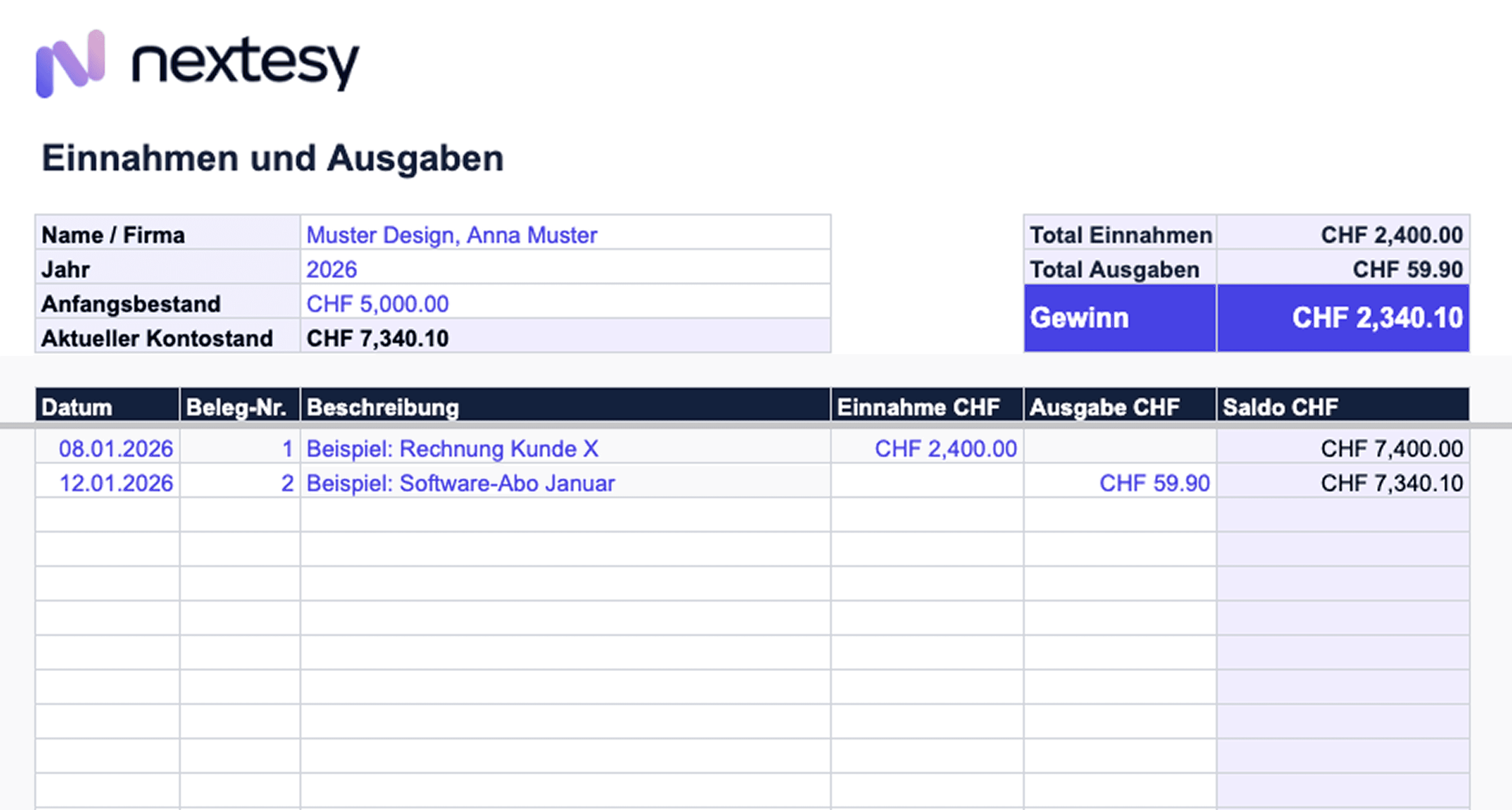
At the top of the tab, you enter your master data once: Name, company name, year, and starting account balance. These fields form the basis for all calculations.
Below that is a journal where you enter each receipt individually. For each line, you record:
Date of the receipt
Receipt number (write the same number on the physical or digital receipt)
Description of the transaction
Amount as either income or expense
You do this for every receipt you receive or issue. To the right of the master data at the top, the template automatically calculates the current account balance, the sum of income, the sum of expenses, and the profit or loss.
"Overview" Tab
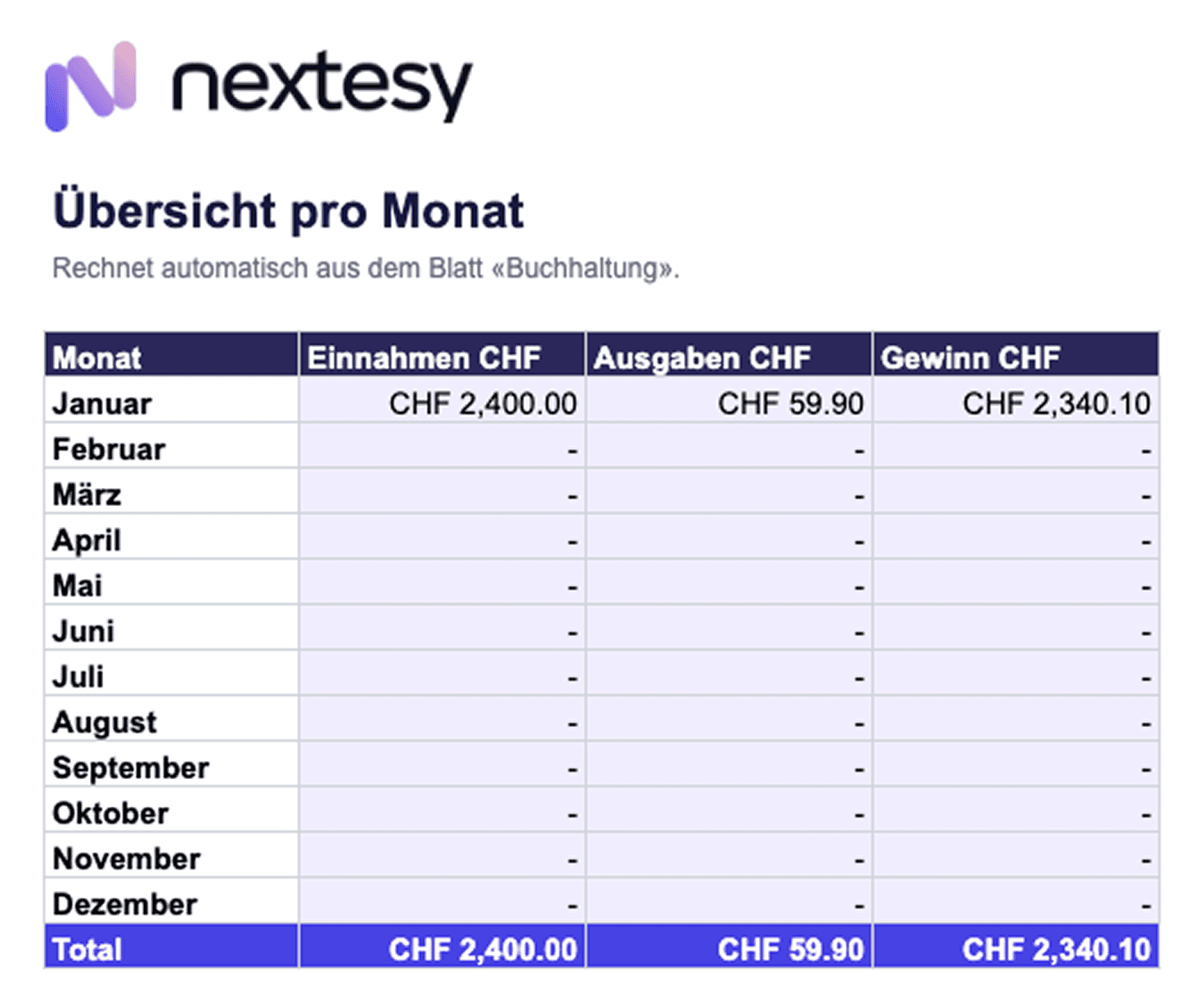
In the "Overview" tab, you will see an automatic summary of income and expenses on a monthly basis. This allows you to see at a glance in which months you earned or spent more, without having to search through individual receipts.
How to Work Efficiently with the Template
Enter receipts at least once a week instead of pushing everything to the end of the year. Assign receipt numbers consistently from the start, so that each line in the journal can be assigned to a specific receipt. Attention: You still have to keep all your receipts! Anyone who conducts cash transactions must also keep a cash book. Save the file regularly to the cloud so that it is not lost in the event of a device failure.
A cleanly kept template can be prepared for the tax return in a few minutes. Anyone who neglects the entries will pay for it at the end of the year with hours of extra work.
From an annual turnover of CHF 100,000, you will also need a VAT sheet that divides taxable sales by rate and calculates the tax liability per quarter for the FTA.
Who is Allowed to Keep Accounts in Excel?
Excel accounting is permitted in Switzerland for sole proprietorships with an annual turnover of under CHF 500,000; LLCs (GmbH) and corporations (AG) are excluded from this. The legal basis is provided by the Code of Obligations: Art. 957 para. 2 CO allows sole proprietorships and partnerships below this turnover threshold to use a simple income-expense statement. You can find out more about the basics of accounting on the nextesy blog.
Anyone running an LLC or corporation is required to keep double-entry accounts with a balance sheet and income statement. For these legal forms, Excel is structurally unsuitable because it does not automatically generate double-entry bookings, a balance sheet, or an income statement.
Company Form / Turnover | Accounting Obligation |
|---|---|
Sole proprietorship or partnership under CHF 500,000 | Simple income-expense statement permitted |
Sole proprietorship or partnership over CHF 500,000 | Double-entry accounting with balance sheet and income statement mandatory |
LLC (GmbH) or corporation (AG) (regardless of turnover) | Double-entry accounting with balance sheet and income statement mandatory |
From an annual turnover of CHF 100,000, the VAT liability begins. The FTA requires a quarterly declaration, which significantly increases the complexity of Excel accounting. All accounting documents and receipts must be kept for ten years (Art. 958f CO). This applies to the Excel file itself as well as to all copies of receipts.
The Most Common Mistakes in Excel Accounting
Excel does not forgive careless clicks: Anyone who overwrites formulas or forgets receipts will have a problem during the annual financial statement. These five mistakes keep popping up in practice:
Missing receipt numbers: Without numbers, no line can be assigned to a specific receipt during a tax audit by the FTA. Every booking needs a number, and every receipt needs this number written on it.
Mixed personal and business payments: Personal and business payments must be strictly separated. A separate business account solves this problem structurally.
No cloud backup: An Excel file on a local device is a single point of failure. Backups to the cloud, at least weekly, are mandatory.
Accidentally overwriting formulas: Anyone who types an amount into a cell containing a formula destroys the calculation silently in the background, often without it being noticed immediately.
Excel also does not meet the integrity requirements of Art. 9 AccO (GeBüV) which have been in force since 1 January 2025: changes to cells cannot be tracked completely because Excel does not generate an audit trail. During a tax audit, this is a structural problem that goes beyond individual operating errors.
Where Does Excel Accounting Reach Its Limits?
As soon as VAT, QR bills, or payroll processing come into play, Excel becomes an effort multiplier instead of a time saver.
The rule of thumb is: Excel is sufficient for fewer than twenty transactions per month, an annual turnover under CHF 100,000 without VAT liability, and no employees. Anyone who exceeds this limit or plans to do so soon will invest more time in maintaining the spreadsheet than a software subscription would cost. A structured overview of the available options is provided in the accounting software comparison.
A system change in the middle of the financial year means double the effort. On the other hand, anyone who switches at the beginning of a new financial year starts with a clean cut and avoids double work.
When is it Worth Switching to Accounting Software?
Concretely, this applies from the moment VAT is incurred, QR bills are issued regularly, or you record more than 20 transactions per month.
nextesy is an AI-native accounting software designed specifically for the Swiss compliance reality: VAT, AHV, ALV, BVG, and Swiss QR bills are directly integrated.
Receipt recognition: Send your receipts to nextesy via email, WhatsApp, or upload, where they are automatically categorised and booked.
AI accounting: The nextesy AI automatically suggests suitable booking rules for repetitive bookings, saving you hours of manual booking work.
Multi-bank reconciliation: Bank statements are automatically imported and reconciled.
Swiss compliance: VAT, AHV, ALV, and BVG are directly integrated; legal changes are updated automatically.
Fiduciary access: Fiduciaries get direct access to the client without file transfers via email.
nextesy is supported by Innosuisse and accompanied by the ETH AI Center. The software costs from CHF 29/month for SMEs and is ideal for freelancers or sole proprietors who have little or no accounting knowledge. nextesy offers a 14-day free trial with no credit card required. Anyone switching from another solution pays only CHF 1/month during the migration.

